How to Succeed in the YouTube Music Niche in 2026
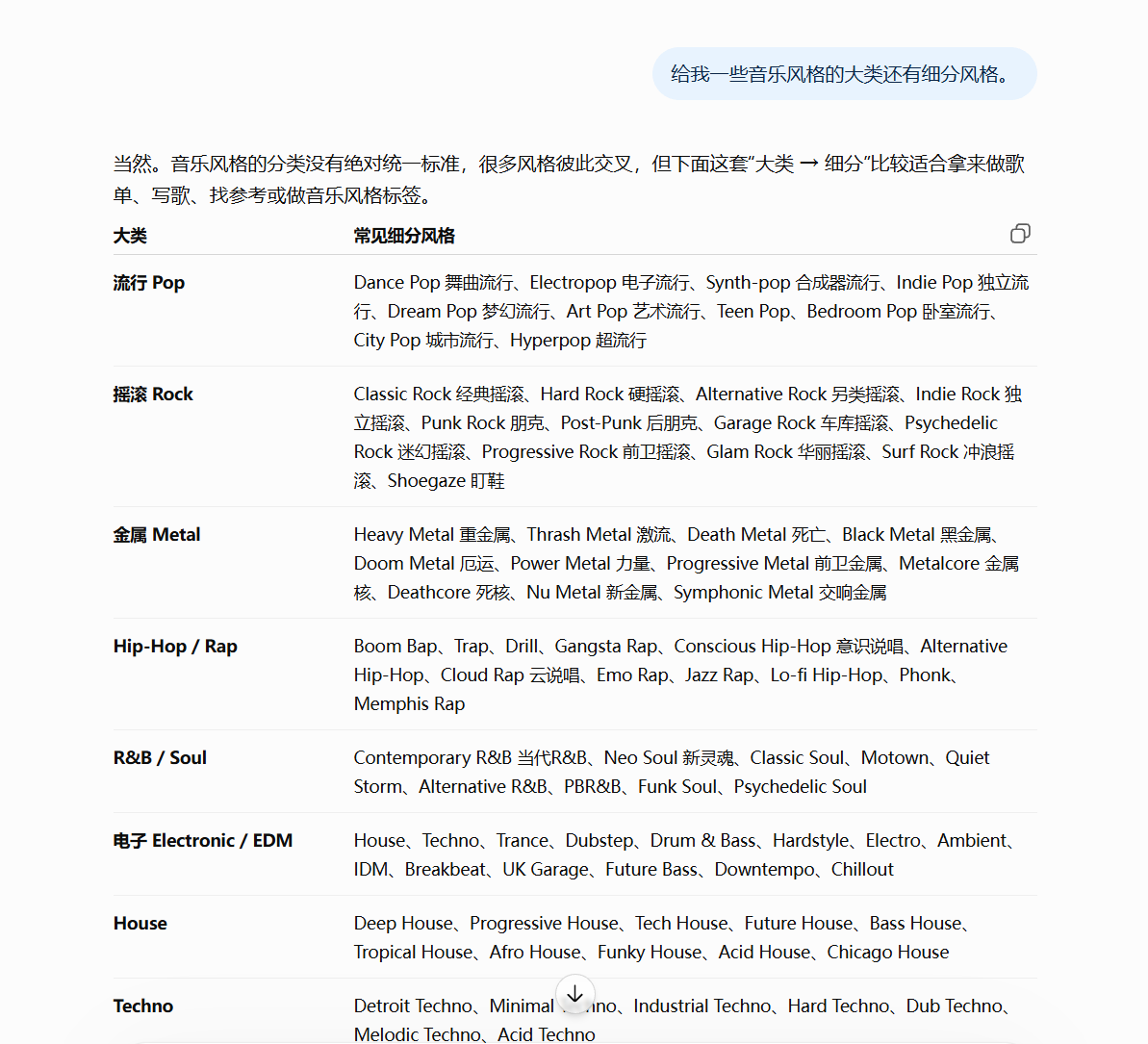
To find a music genre, start by talking with AI. Ask AI to recommend broad music categories, then choose more specific subcategories to find the type of music you want to make. At this stage, you only need to identify a few keywords.
(1) Find a Music Genre
To find a music genre, start by talking with AI. Ask AI to recommend broad music categories, then choose more specific subcategories to find the type of music you want to make. At this stage, you only need to identify a few keywords.
Once you find a genre you want to try, enter it into the YouTube search box and look for recent viral videos.
After searching, first filter by three criteria: long videos over 20 minutes and videos published within the past month.
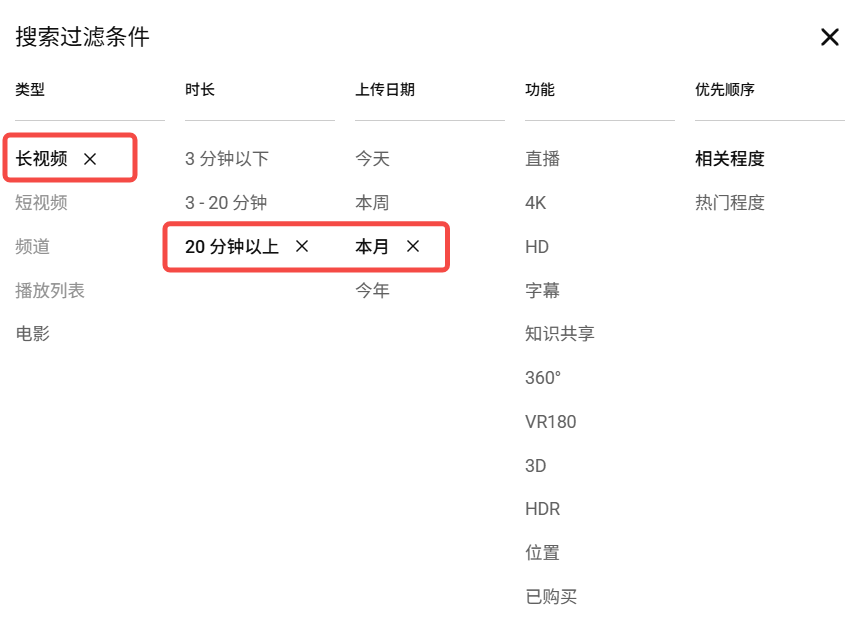
Then review the search results one by one, focusing on videos that have already exceeded 10,000 views. When you see a video that meets the criteria, open its channel page and continue examining the account.
(2) Number of Videos and Channel Start Date
After opening the channel page, focus on two things: the number of videos and when the channel started.
Ideally, the channel should have no more than 15 videos. If you cannot find one, you can relax the criterion slightly, but finding a channel with 15 or fewer videos is still best.
Ideally, the channel should have started within the past month. Accounts that new are indeed difficult to find, so in practice, you can gradually relax the criterion.
If you cannot find one within a month, look at channels started within the past two or three months. All of these can be tested.
To determine the earliest point when the channel started, check its earliest publication date.
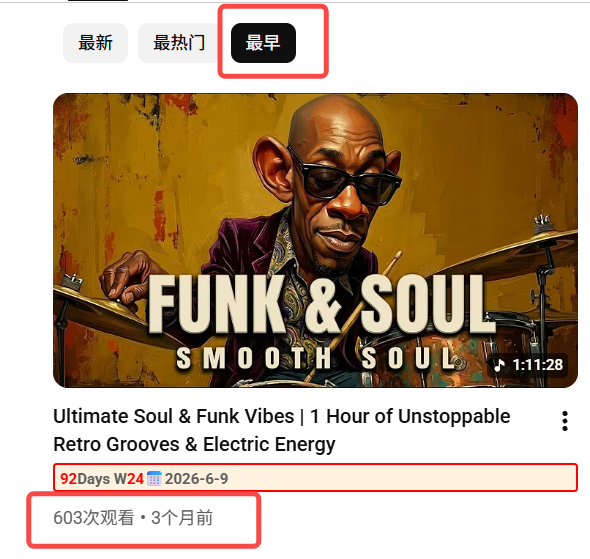
The goal is to find accounts that have not published many videos and started relatively recently, but already have content that has gained views.
After finding a benchmark like this, continue checking whether anyone is copying it.
(3) Search for Competitors Using the Viral Video Title
After finding a benchmark, there is one more thing to do: take the title of its most viral video and search for it again in the YouTube search box.
This time, focus on whether anyone is copying it and how many competitors are making similar content.
If the search results look like the image below, with many accounts using the same title, do not enter this niche. Keep looking for the next one.
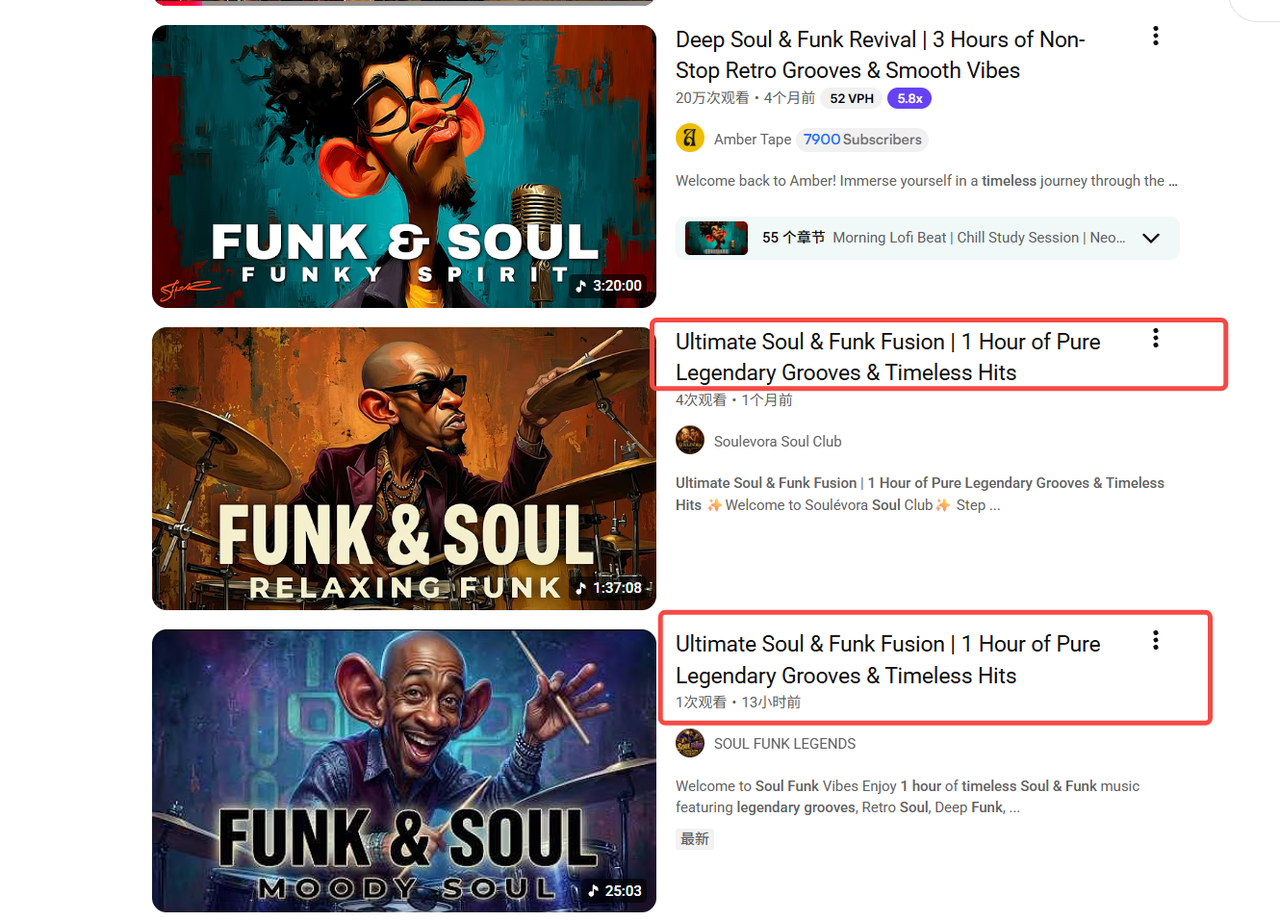
If the search results show virtually no accounts following the same approach, this is a very good benchmark and should receive priority.
Another possibility is that some people are already following it, but there are not many of them. In that case, open those accounts and see how many views their videos are getting.
If their videos are already getting several hundred views, it indicates that this direction is still viable and can be tested.
However, if their thumbnails and video quality are already about as good as the original benchmark, but they only get a handful of views, do not consider pursuing it. Copying it would probably bring no traffic either.
You must be patient when choosing a niche. A benchmark that meets the criteria may not be easy to find, but you still need to keep searching and try to identify the best sub-niche possible.
Do not decide to pursue something just because you personally think the music or direction is good. Review the number of videos, the channel start date, and the accounts following the same approach, as discussed above, before deciding whether to test it.
Create the Music
(1) Reverse-Engineer the Music Style
After finding the niche, the next step is to recreate the benchmark video. For the music, you will use Gemini and Suno.
First, use Gemini to reverse-engineer the benchmark's music style. You will use a prompt here.
You are now an experienced music producer and a Suno AI prompt expert.

Do not mechanically apply a fixed structure. You must identify the section types based on how the original song actually sounds. If the original has no Pre-Chorus, Bridge, Solo, or similar section, do not force one into the structure.
For important sections, add English descriptions to the Meta-tags that help Suno understand changes in the original song's dynamics, instrumentation, and vocals, for example:
[Intro: Ambient synth pad, filtered vocal texture]
[Verse 1: Minimal drums, intimate vocal]
[Pre-Chorus: Rising tension, layered harmonies]
[Chorus: Full instrumentation, powerful drums, wide backing vocals]
[Breakdown: Sparse percussion, whispered vocal]
[Final Chorus: Bigger drums, octave vocal layers, emotional climax]
[Outro: Instrumental fade out]
Also analyze distinctive vocal techniques in the original song and mark them in the corresponding places with parentheses (), for example:
(whisper)(falsetto)(breathy vocal)(spoken)(choir backing)(layered harmonies)(ad-libs)(vocal chop)(call and response)

Using the first song at the link I provide as the basis, break down the actual lyrical content section by section and identify where each section begins, so that the Lyrics template corresponds to the original song as accurately as possible.
If I provide the lyrics directly, or if the text can be used in full, organize the original lyrics section by section under the corresponding [Verse], [Chorus], [Bridge], and other tags.
Accurately label the song structure of every section;
Briefly summarize in concise Chinese the specific content, theme, and emotion expressed by that section's lyrics;
When necessary, quote only extremely short keywords or phrases from the original lyrics to confirm the section's location;
Preserve the original song's repetition pattern, such as how many times the Chorus repeats, whether the Final Chorus changes, and whether the Outro repeats a particular line;
Reproduce the number and length of lines, lyrical density, rhyme rhythm, and vocal delivery as closely as possible, so that new lyrics with the same structure can be created later.
Finally, output a complete structural template that can be used directly as a reference in Suno's "Lyrics" box. Give me the style prompt and lyrics in copyable code blocks, with no unnecessary explanation.
The point is not to simply summarize the song, but to break down its "lyric entry pattern + section lengths + repetition relationships + vocal techniques + arrangement dynamics" as completely as possible, so that I can directly reference this structure to create a new song in Suno with a structure, progression, and emotion that closely match the original.
After reverse-engineering the style prompt, take it into Suno and test it.
During the initial tests, use the benchmark's lyrics first. This makes it easier to accurately reverse-engineer its music style.
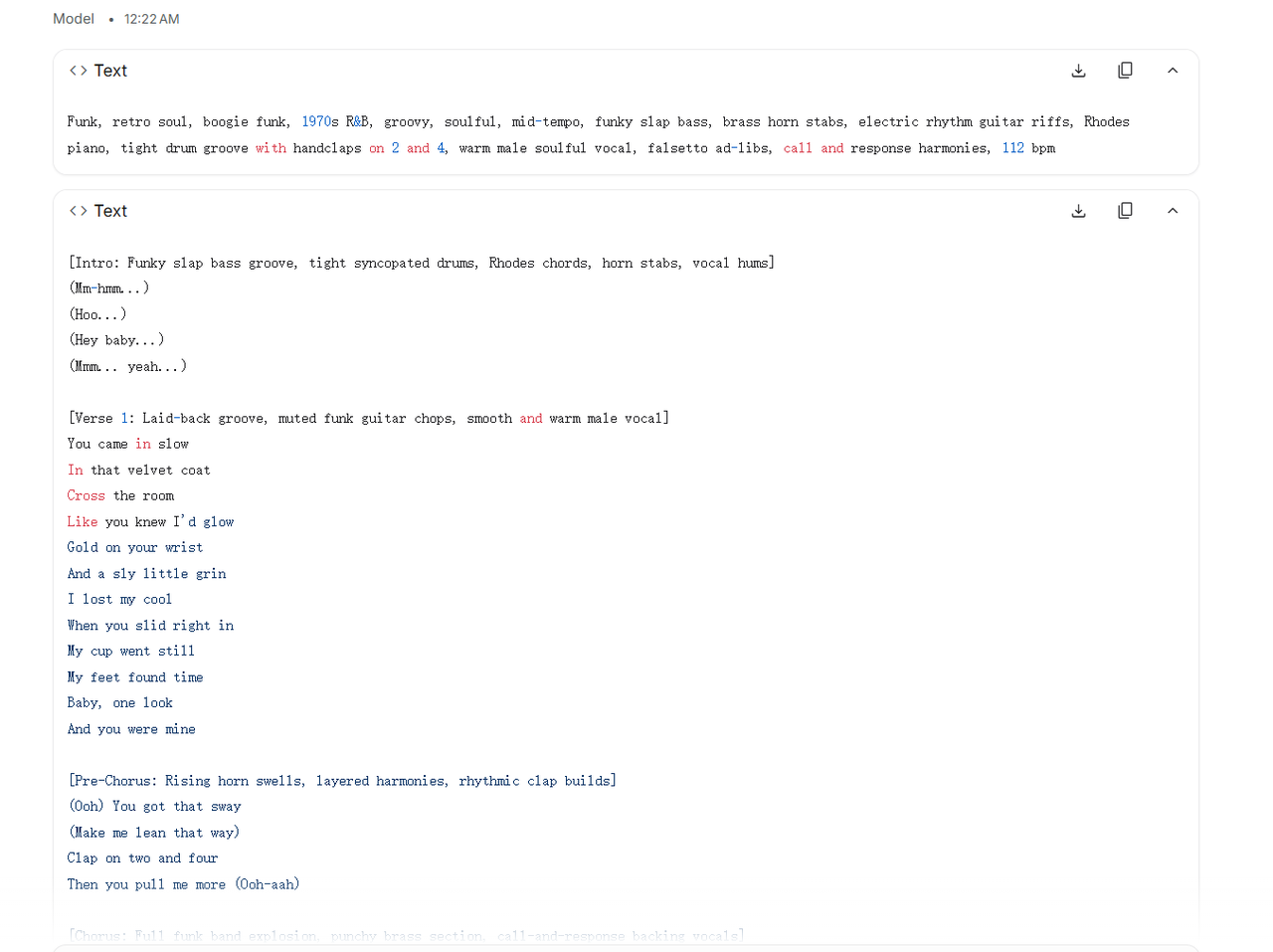
After generating the music, you need to listen to it and judge for yourself whether it feels right.
If it does not feel right, tell Gemini exactly what is wrong and ask it to adjust the style prompt. After the adjustment, take it back into Suno, generate again, and listen to the new result.
You need to participate in the judgment at this stage. Gemini can help adjust the prompt, but you still need to listen for yourself to determine whether the generated music resembles the benchmark and how it feels different. When you find something wrong, keep giving feedback and making adjustments until the style is right.
(2) Generate the Music
After the style prompt is ready, the next step is to write the lyrics. You will also use a prompt to write them.
[Style Prompt]

This is my Suno music style prompt. Help me write some English lyrics that fit this style, and give the song a title. Give me the lyrics for each song in a separate code block.
During the earlier testing, use the benchmark's lyrics to find the right musical feel. At this stage, write the lyrics for the music you will make next.
Once the lyrics are ready, take them into Suno together with the refined style prompt to generate the music.
(3) Determine the Video Length, Number of Songs, and Number of Repetitions
After the music is finished, also check the benchmark's video length and how many songs it actually uses.
Some music videos look very long, but the songs inside them are played repeatedly. For example, the video might play 5 songs first and then duplicate those same 5 songs once.
So you need to clearly examine three things here: the total length of the video, the actual number of songs, and how many times those songs are repeated.
If the benchmark uses 5 songs and then duplicates them once, follow that structure. First check how the benchmark is arranged, then imitate it to decide exactly how many songs to generate and how many times to repeat them afterward.
After completing the music, the next steps are the thumbnail, title, and description.
Create the Thumbnail
I currently use ChatGPT to generate thumbnails. It recreates image styles very accurately and works very well.
The process is straightforward: download the benchmark thumbnail, upload it to ChatGPT, then enter the prompt and ask it to recreate an image in a similar style.
Imitate the style of this thumbnail. Change the character's clothing, appearance, and pose, and create 1 completely new and original thumbnail. Aspect ratio: 16:9.
Write the Title
Publish the Video and Test the Accounts
(1) Test the Same Niche with at Least Three Accounts
When starting out, use at least 3 accounts, ideally 3–5 accounts, to test the same niche at the same time.
Long-form videos sometimes receive no traffic because of the account, and some channels remain stuck at zero views. If you test with only one account, it is difficult to determine whether the problem is the niche or the channel.
Therefore, evaluate several accounts together and use their view counts to decide what to do next.
(2) Publish at Least Three Videos on Each Channel, 2–3 Days Apart
When starting the channels, first publish at least 3 videos on each channel, one every 2–3 days. After publishing three videos, which takes about a week, review the view counts.
If all three videos on a channel have zero views, create a new channel immediately.
(3) Decide Whether to Keep Publishing, Switch Channels, or Switch Niches Based on the View Counts
If one of the three accounts gets traffic, it means the niche can generate traffic. Continue publishing on the account that gets traffic. Treat the other two accounts with no traffic as channel problems first and create new channels immediately.
You do not need to do anything with the channels that get no traffic; just leave them there. After creating the new channels, continue publishing new content in this niche.
Continue publishing on the account that gets views for one month and see how its overall traffic performs. If it still does not get much traffic afterward, test another niche.
If none of the three accounts gets traffic, I will conclude that the niche has a problem and switch to another niche.